Why UniFi Is the Sweet Spot for Enterprise Engineers and Homelabbers
When you manage enterprise IT for a living, your relationship with home networking gets complicated.
On one hand, consumer "gaming" routers are an immediate non-starter. They lack proper VLAN support, give you zero visibility into traffic, and crash the moment you spin up a few local Docker containers. On the other hand, bringing full-blown enterprise gear home—think Cisco, Palo Alto, or Fortinet—means dealing with noisy server fans, command-line-only configurations, and thousands of dollars in annual software licensing fees just to keep security signatures updated.
As a 12-year IT Systems Engineer and Systems Administrator veteran, I need something that bridges this gap. I want enterprise-grade traffic isolation, deep packet inspection, and rock-solid stability, but I don't want to spend my weekends troubleshooting CLI scripts just to adopt a new Access Point.
This is why Ubiquiti UniFi sits at the absolute core of my network at SelfHostedBytes. It delivers the perfect middle ground: simple enough to run seamlessly in a home environment, but robust enough to power enterprise infrastructure.
The Enterprise Dilemma vs. The UniFi Difference
In a corporate environment, enterprise networking vendors charge you for everything. You buy the hardware, and then you pay an annual subscription per switch, per access point, and per firewall feature. If a license expires, your security features turn off.
UniFi flips that model on its head:
- Zero Recurring Licensing Fees: You buy the hardware once. Full site-to-site VPNs, Intrusion Prevention System (IPS) threat logging, and continuous firmware updates cost $0 per year.
- Single Pane of Glass Management: Whether I'm managing multi-gigabit WAN routing, SFP+ switch backbones, Wi-Fi access points, or downstream Ubuntu server nodes, everything reports into one central console.
- Prosumer Accessibility: The UI exposes complex networking concepts—like 802.1Q VLAN tagging, Port Isolation, and Firewall State Rules—in a visual way that takes seconds to configure instead of writing 50 lines of syntax.
How I Structure My UniFi Network Architecture
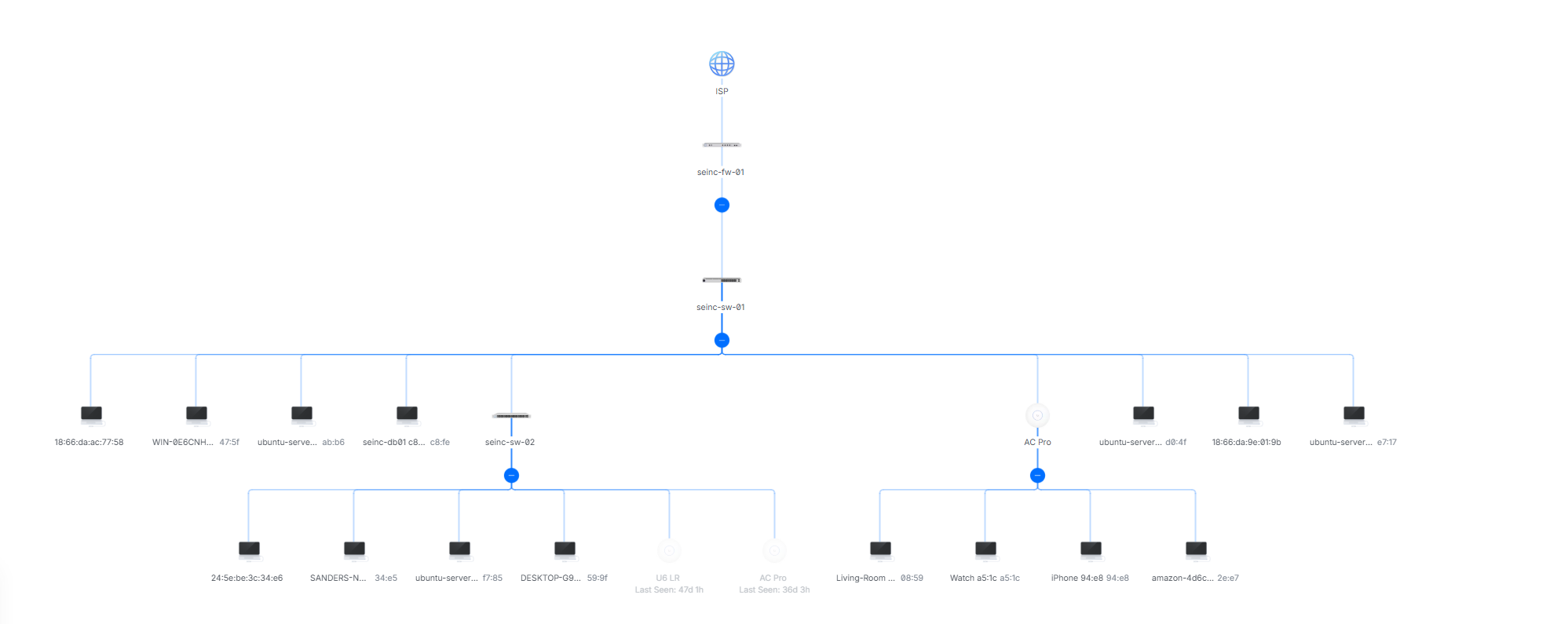
To keep my experimental homelab workloads, core databases, and guest traffic isolated, I use UniFi's software-defined networking (SDN) to carve my topology into distinct, dedicated security zones.
                                    [ ISP ]
                                       │
                              [ seinc-fw-01 ]
                               (UniFi Gateway)
                                       │
                              [ seinc-sw-01 ]
                             (Core UniFi Switch)
                                       │
     ┌─────────────────────────────────┼─────────────────────────────────┐
     ▼                                 ▼                                 ▼
[ VLAN 1: Management ]       [ VLAN 10: Core Subnet ]       [ VLAN 20: Guest ]
(192.168.1.0/24)             (10.10.0.0/16)                 (192.168.20.0/24)
(seinc-mgmt)                 (Ubuntu Nodes, DBs, PCs)       (Sanders-Guest)
1. Dedicated Management Zone (seinc-mgmt - VLAN 1 | 192.168.1.0/24)
Network isolation starts at the core. My management subnet is reserved strictly for infrastructure management, key gateways (seinc-fw-01), and switch interconnects (seinc-sw-01, seinc-sw-02).
2. Core Production & Lab Subnet (Core - VLAN 10 | 10.10.0.0/16)
Instead of constraining my environment to a typical /24 network (254 host IPs), I run a large /16 space for my core subnet. This gives me massive headroom to logically divide IP blocks for physical workstations, database servers (seinc-db01), and multiple Ubuntu server instances without worrying about DHCP address exhaustion or subnet clutter.
3. Guest Network Isolation (Sanders-Guest - VLAN 20 | 192.168.20.0/24)
Guest and untrusted traffic live on a separate subnet. It provides clean outbound internet access while keeping guest hardware completely isolated from management interfaces and core database nodes.

Why UniFi Is the Ultimate Homelab Foundation
When you run a homelab, you spend a lot of time spinning up new services, testing open-source code, and breaking configurations.
UniFi acts as the ultimate safety net. If an experimental script goes haywire or a test container tries to flood the local network with traffic, UniFi's traffic shaping and switch port limits contain the blast radius. My family’s streaming and Wi-Fi stay completely untouched while I troubleshoot.
It gives me the deep telemetry, threat monitoring, and infrastructure control I expect in my professional engineering role—without feeling like I brought my day job home with me.